 Pulse Sentinel
Know your sensors work, and how far to trust them.
Pulse Sentinel monitors the health of connected sensors and devices to show whether each one is working as it should, and how much trust to place in what it reports.
What it does
System behaviour
Pulse Sentinel is the sensor health assurance layer. It checks that cameras and other sensors are working as they should and gives operators a view of how much trust to place in each output. It is designed to detect problems such as spoofed or drifting position data, heat or vibration degradation and signal faults, and to report them as sensor trust faults. Operators see it in Consilium, where orchestration can treat an affected sensor as untrustworthy or offline.
Position in the ecosystem: Deploy Pulse Sentinel as a standalone sensor-assurance service, or as the health and trust layer beneath the wider Espanaro solution set.
Three principles
The principles behind Pulse Sentinel
Healthy
Check that each sensor and device is working as it should.
Trusted
Express how far each sensor output can be relied on.
Reported
Pass trust faults to Consilium so workflows can react.
The challenge
Operators rely on cameras and sensors, but a sensor can fail quietly. It may drift, degrade, lose signal or be fed false data while still appearing to be online.
Decisions built on an untrustworthy sensor are untrustworthy too, and the fault is often found only after the event.
Operational value
Pulse Sentinel delivers:
- Early warning of sensor faults
- Clear view of sensor health
- Confidence in sensor outputs
- Trust faults visible to operators
- Fewer decisions on bad data
Pulse Sentinel observes health and behaviour signals from connected sensors and devices, compares them with expected operating patterns, and assigns a health and trust state to each. Faults and trust changes are reported into Consilium, with the history kept for review, so a sensor can be flagged, down-weighted or taken out of use. Think of it as a live check for sensors, in the way an MOT is for a vehicle.
Architecture
How it works
Pulse Sentinel works in four steps, from observe to report.
- 01ObserveSensor health signals
- 02CompareAgainst expected patterns
- 03AssessHealth and trust state
- 04ReportFaults into Consilium
Core capabilities
Three building blocks for sensor assurance
Health Monitoring
Track connection, check-in and device health for every connected sensor.
Fault and Anomaly Detection
Identify faults, drift, degradation and signs of tampering against expected patterns.
Trust State and Reporting
Express how far each sensor can be trusted and report changes into Consilium.
Solution in action
See Pulse Sentinel working
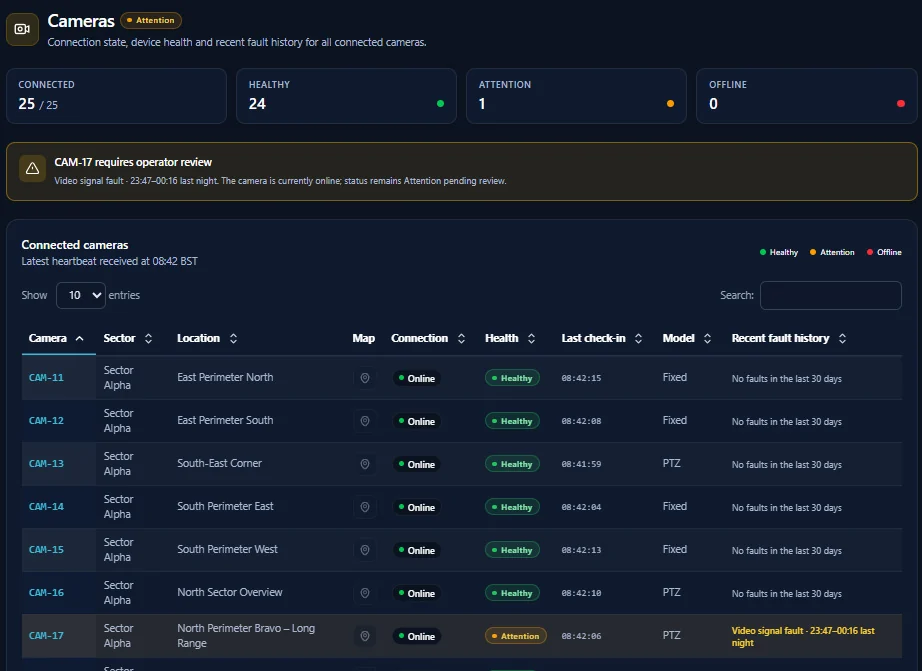
Pulse Sentinel assures sensor health, so operators know whether each sensor is working as it should and how far to trust what it reports. These screens come from an Espanaro demonstration environment.
Health states, faults and counts shown are demonstration data.
Use cases
Where Pulse Sentinel makes the difference
CCTV and Camera Estates
Spot cameras that have lost signal, degraded or gone quiet before an incident exposes the gap.
Counter-UAS and Detection Sensors
Check that detection sensors are working and reporting trustworthy data.
Position and Timing Sources
Flag spoofed or drifting position data before it misleads operators.
Trials & Evaluation
Assess sensor reliability and trust within controlled pilots.
Integration and deployment
Works with the systems you already run
Pulse Sentinel is designed to operate across diverse sensor and device environments. It can take health and status signals from existing systems, assess them and return sensor health and trust state to operators, dashboards or command platforms such as Consilium.
| Integration area | Supported approach |
|---|---|
| Sensor & device data | Status, heartbeat and telemetry from physical and digital sensing systems. |
| Application interfaces | APIs and structured data formats including JSON and XML. |
| Message & event distribution | Event-driven and message-based integration patterns including MQTT and DDS. |
| Video & surveillance systems | Integration through platforms and interfaces including ONVIF and RTSP where applicable. |
| Command & workflow systems | Trust faults can be consumed by Consilium or integrated into third-party operational tooling. |
Delivered with Espanaro
Sensor assurance, built in the UK
Supported by Espanaro capability
The engineering teams behind Pulse Sentinel also support its integration, deployment and operation.
How to engage
- 1Discovery
Understand the sensor estate, operational environment and the faults that matter most.
- 2Sensor-Integration Workshop
Shape health signals, expected patterns and trust reporting around your mission.
- 3Pilot
Evaluate Pulse Sentinel in a controlled deployment ahead of wider operational rollout.
Solution datasheet
Download the Pulse Sentinel Datasheet
A concise technical overview of Pulse Sentinel: capabilities, use cases, integration and deployment. Fill in your details and the datasheet unlocks immediately.
- Technical capability summary
- Operational use cases and deployment context
- Integration and ecosystem overview
- PDF, free to download
Discuss Pulse Sentinel
Know which sensors you can trust before you act on them.
Speak to Espanaro about a Pulse Sentinel discovery, sensor-integration workshop or pilot deployment.